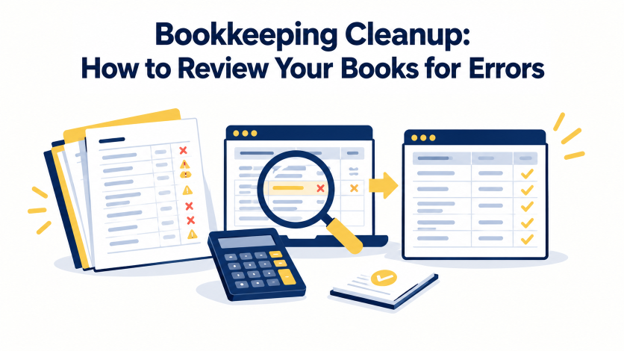
Bookkeeping cleanup helps you identify and correct inaccurate entries, so your financial records reflect your business activity. You can clean up messy books by reviewing your financial records for duplicate transactions, missing entries, incorrect expense categories, and discrepancies between your books and bank statements.
This guide explains how to review your books for errors, reconcile accounts, and verify corrections. Professional catch-up bookkeeping services can also help you maintain accurate records, resolve discrepancies, and keep your books organized throughout the year.
How to Run a Bookkeeping Cleanup Review
To check books for errors, you need to set up a review period and reconcile your cash accounts. Here are the exact steps to keep your bookkeeping cleanup organized.
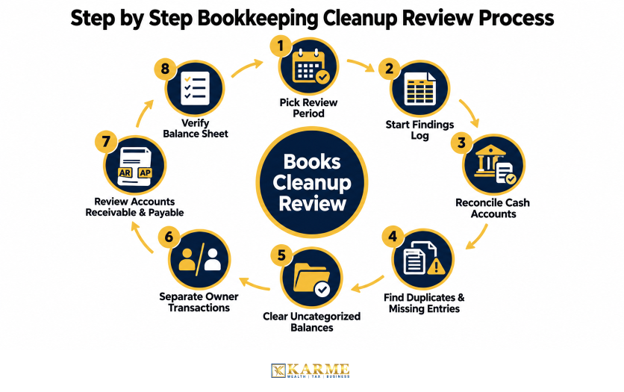
Pick Your Review Period
Start with the earliest month you have not reconciled, then work forward month by month. The IRS generally recommends keeping tax records for at least 3 years, or 6 years if you omit more than 25% of your gross income. So, include any open tax years in your review. Once you set the date range, lock filed periods to prevent accidental changes and avoid bookkeeping mistakes.
Keep a Record of Every Error
Before making corrections, create a spreadsheet to track every issue you find. Include the date, account, problem, amount, correction, and status. For example, a $1,240 discrepancy in March could come from a January transaction that someone edited after reconciliation.
Record every correction so you can explain what changed and why. Never delete a transaction without documenting the reason.
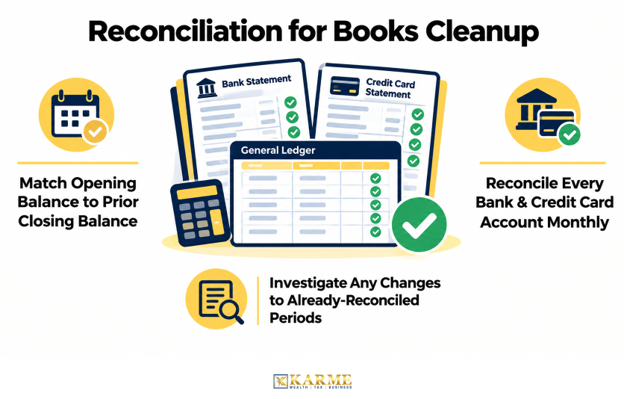
Complete Books Reconciliation First
With your error log ready, reconcile each bank and credit card account against its monthly statements. Check that each month’s opening balance matches the previous month’s closing balance. If the numbers do not match, someone may have changed or deleted a transaction that you had already reconciled.
Find Duplicates and Missing Entries
Once your cash balances match, sort your transactions by amount and then date. Look for identical amounts recorded within a few days of each other.
For example, a $389 lease payment may appear twice even though you paid it only once. If you leave the duplicate in your books, your expenses will be too high.
Next, check recurring payments and deposits to see if any months are missing. If you find entire months without transaction records, you need catch-up bookkeeping to bring your records up to date.
Clear Suspense and Uncategorized Balances
Check accounts such as Uncategorized Income, Uncategorized Expense, Ask My Accountant, and Opening Balance Equity. These accounts may contain transactions that still need to be identified or assigned to the correct category. Start by finding out who received or sent each payment. Then correct the largest unexplained amounts first.
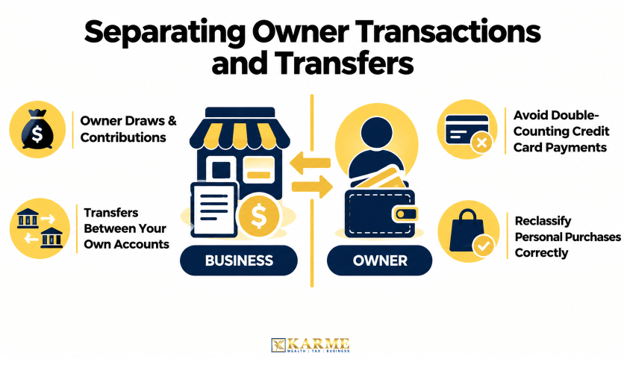
Separate Owner Transactions and Transfers
Review owner withdrawals, owner contributions, and transfers between your own accounts. These transactions should not automatically be treated as business income or expenses.
Also, identify personal purchases that were incorrectly recorded as business expenses. For example, a $2,000 personal tax bill should not automatically appear under the business Taxes account. Check what the payment was for and assign it to the correct category.
Review Accounts Receivable and Payable
Check whether your accounts receivable and accounts payable match what customers owe you and what you owe vendors. Compare your aging reports with actual balances and look for overdue invoices, unapplied credits, and outdated entries.
According to Intuit QuickBooks’ 2025 Small Business Late Payments Report, 56% of small businesses had unpaid invoices, averaging $17,500. Also, review Undeposited Funds and write-offs to catch errors that could overstate your income.
Verify Your Balance Sheet
Now that individual accounts are in order, compare your balance sheet with external records. Make sure your loan balances match year-end lender statements. Also, make sure your payroll and sales tax liabilities match the amounts you filed and paid.
Finally, review your profit and loss statement, balance sheet, and bank reconciliations together. Your bookkeeping cleanup is complete when the account balances are supported by reliable records and the financial reports are consistent with the underlying transactions.
How to Keep Your Books Clean Afterward
Once your books are clean, the goal is to keep them that way. Set aside time each month to reconcile accounts, review transactions, and catch errors early. If the workload becomes too much, consider getting ongoing bookkeeping support.
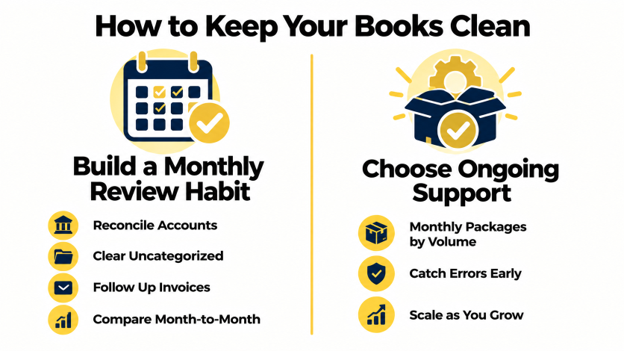
Building a Monthly Review Habit
Use a monthly bookkeeping checklist to stay on track. Reconcile your accounts, clear uncategorized transactions, follow up on overdue invoices, and compare your financial results with the previous month. You have already done the hard work during the cleanup. Now, make these checks part of your routine.
Importance of Ongoing Support
Running a business keeps you busy, and bookkeeping can easily fall behind. Monthly bookkeeping helps you catch errors early, while receipts, invoices, and transaction details are still easy to find.
At Karme, our monthly bookkeeping packages are based on your monthly expenses and transaction volume. This way, you can choose the level of support that fits your business and budget. Start with what you need today, and adjust as your business grows.
FAQs
Q1. How long does a bookkeeping cleanup take?
It depends on how far behind your books are, how many accounts you use, and how complete your records are. Cleaning up a few months of transactions may take a few days, while fixing several years of errors can take weeks.
Q2. How much does a bookkeeping cleanup cost?
The cost depends on how many months need attention, your transaction volume, the number of accounts, and the condition of your records. Most providers review your books before giving you a quote, so you know what the cleanup will involve.
Q3. Do I need every receipt before starting?
No. Bank and credit card statements, invoices, and payment processor reports can help you reconstruct most transactions. Keep any receipts you have, too. Your tax preparer may need them to verify certain deductions.
Q4. Should I back up my books before making corrections?
Yes. Always save a copy of your accounting file or export your ledger and financial reports before making changes. If something goes wrong, you can compare the corrected records with the original and restore the backup if needed.
Q5. Will fixing old errors mean amending my tax return?
Not always. You may need to amend a previously filed return if an error changed your reported income or deductions. However, reclassifying transactions without changing the total expense amount may not affect your tax return. So, review any significant errors with your tax preparer before amending.
Q6. Can a cleanup help if I have unfiled tax returns?
A cleanup can organize the records needed for back taxes, but it alone doesn’t prepare or file returns. Unfiled years usually need separate tax preparation, so tell your preparer which periods are outstanding.
Final Words
A successful bookkeeping cleanup starts with reconciling cash, fixing the most serious errors first, and documenting every change. But if your books are a mess, sorting everything out can take more time than you have. That is where professional guidance can help.
At Karme, we review your existing records and reconcile your bank and credit card accounts month by month. We fix duplicate transactions, fill in missing entries, and prepare tax-ready reports with a clear summary of every change. Once your books are in order, our monthly bookkeeping services keep them accurate and up to date. Contact us today to get your books back on track.